

Contracting guide
How to choose a NAICS code for government contracts
Choose a North American Industry Classification System code by matching what you sell to the official definition, size standard, and live federal demand.
Some screenshots and steps describe an earlier edition of GovGazette. Use Search to explore today's records.
Start with what you sell
Choose the North American Industry Classification System (NAICS) code whose definition best matches one product or service you already deliver. Do not search for a broad “government contractor” code. The code describes the work, not your plan to sell it to an agency.
Write the offer in plain English before you open a code list: “install low-voltage network cabling in occupied buildings” is useful. “IT solutions” is not. A clear offer gives you words to search and a boundary for rejecting close but wrong codes.
Know which code answers which question
Your primary NAICS code describes the main line of business for your company profile. You may list more than one code when you sell more than one real product or service. A long list of codes does not create capability.
A solicitation has its own NAICS code and size standard. Federal Acquisition Regulation 19.102 tells the contracting officer to choose the code that best describes the principal purpose of the product or service being acquired. Your company profile does not override that choice.
Product and Service Codes (PSC) answer a related question about what the government bought. Use NAICS to start with your industry, then check PSC when you need a tighter view of the product or service.
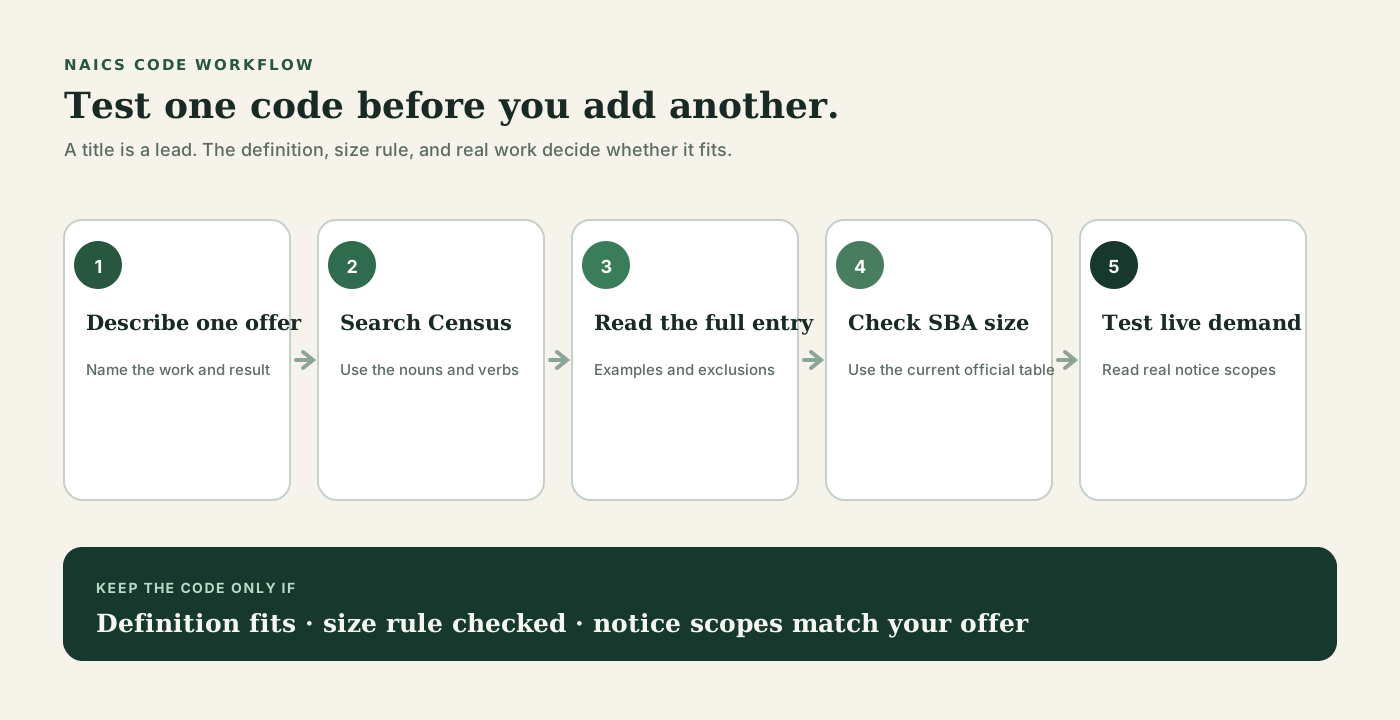
Use this five-step check
Run the same check for each candidate. Stop when the official definition no longer matches your offer.
- 1. Describe one offer: name the work, buyer, place, and result in one sentence.
- 2. Search official NAICS: try the nouns and verbs in that sentence on the Census Bureau site or the NAICS industries reference.
- 3. Read the full entry: check included examples, exclusions, and cross-references. Do not decide from the title alone.
- 4. Check size: open the current SBA table of size standards and find the threshold tied to that code.
- 5. Test demand: review open notices and past awards under the code. Read a sample of notices to see whether the actual scope fits your staff, equipment, and past work.
Example: a low-voltage cabling offer
Suppose a small contractor installs structured network cabling and building alarm wiring. Searching those terms points to Electrical Contractors and Other Wiring Installation Contractors (NAICS 238210), Electrical Contractors and Other Wiring Installation Contractors, as a candidate. That is a lead, not the answer.
Read the Census definition and cross-references. Then open the NAICS industries reference/238210/electrical-contractors-and-other-wiring-installation-contractors and sample the work on /contracts/naics/238210/electrical-contractors-and-other-wiring-installation-contractors. Reject notices for work the firm does not perform, even though the code matches.
If most suitable notices use a nearby code, compare that official definition next. Keep notes on why one code fits better. This turns code selection into a check someone else can repeat instead of a guess based on a label.
What counts as enough evidence?
A sound choice has four parts: the official definition matches the offer, the size rule is clear, live or recent government buys resemble the work, and your firm can perform that scope. If one part fails, compare another code.
Search volume alone does not settle the question. One code may contain several kinds of work. Read the description and attachments on a small sample of notices, then note which terms keep appearing.
- Keep: the definition and real notice scopes match your offer.
- Compare: the title looks right, but exclusions or notice scopes point elsewhere.
- Drop: you chose the code only because it has many notices or a higher size threshold.
- Ask for help: two definitions overlap and the choice affects a live bid. An APEX Accelerator or the SBA can help you review the facts.
Mistakes that waste search time
The common failure is collecting codes instead of testing them. A saved search built on weak codes turns SAM.gov into a firehose and buries work you could actually perform.
- Do not copy every code used by a competitor. Their offer may differ from yours.
- Do not pick a code from its title without reading the official definition.
- Do not choose a code only for a favorable size standard.
- Do not assume the NAICS code proves set-aside eligibility or scope fit.
- Do not treat an old profile choice as final. Review it when your offer changes.
Test one code in GovGazette
Start at the NAICS industries reference. Open a candidate to see its official label, size-standard context, related codes, current opportunity links, and demand evidence. Then use the NAICS industries reference to compare active work by industry.
Open several notices. Check their plain-English descriptions, set-asides, deadlines, places of performance, and official SAM.gov links. If the same kind of unsuitable work keeps appearing, tighten the offer or compare a nearby code before you save the search.
When a notice fits, follow /guides/read-opportunity-page and read its attachments. The public listing helps with research; it does not replace the solicitation.
Limits and source-of-record rule
NAICS codes group industries. They do not prove that you can perform a requirement, qualify for a set-aside, or meet a solicitation's other terms. Definitions and size standards can change, so check the current official pages.
For a live bid, the solicitation and its amendments control. Confirm the assigned code, size standard, eligibility rules, scope, and deadline on SAM.gov. Use GovGazette to research and narrow work, then return to the source record before you decide or submit.
Do this in 30 minutes
Write one offer sentence. Find two candidate codes on the NAICS industries reference, read both official definitions, and reject one. Check the SBA size standard for the code you kept, then read five open notices under it.
Save the search only if those notices contain work you can perform. If they do not, change the code or narrow the offer before another proposal reaches your calendar.
Common questions
Is there one NAICS code for government contractors?
No. A NAICS code describes the industry for the product or service sold. Choose the code that best matches a real offer, then check the official definition and size standard.
Can a business use more than one NAICS code?
Yes. The SBA says a business generally has a primary NAICS code and may have more than one when it sells more than one product or service. Each code still needs to match work the business can perform.
Who chooses the NAICS code on a federal solicitation?
The contracting officer assigns the code that best describes the solicitation's principal purpose. Check the notice and solicitation rather than substituting a code from your SAM.gov profile.
Does a matching NAICS code make a business eligible to bid?
No. It is one check. You must also meet the solicitation's size standard, set-aside, scope, place, deadline, and other requirements.
Sources
- U.S. Census Bureau: 2022 North American Industry Classification System
- U.S. Small Business Administration: basic requirements
- U.S. Small Business Administration: table of size standards
- Small business size standards and North American Industry Classification System codes (FAR 19.102)
- SAM.gov: official contract opportunities