

Contracting guide
How to track SAM.gov opportunity changes
A process for catching deadline, attachment, set-aside, contact, and status changes without calling an import time the official amendment time.
Some screenshots and steps describe an earlier edition of GovGazette. Use Search to explore today's records.
Who this guide is for
This guide is for a small-firm owner, BD lead, or proposal coordinator who reads federal notices and needs to track key changes. You need a free GovGazette account, one focused search, and the official SAM.gov link for each notice you pursue.
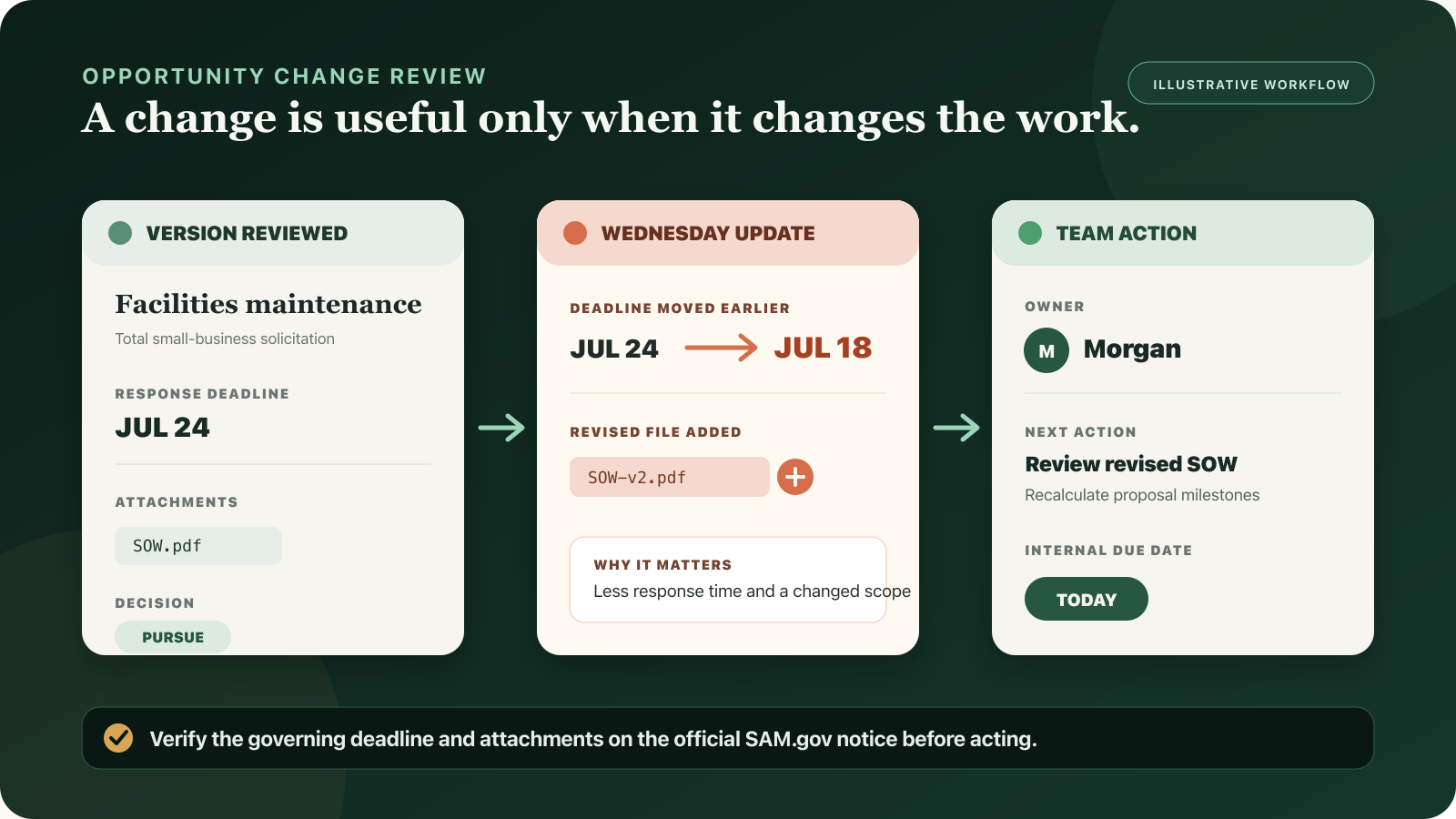
Use this example: your team plans to pursue a total small-business facilities notice. Morgan owns the review. Your go/no-go meeting is Friday. On Wednesday, the response deadline moves earlier and the agency adds a revised SOW. Each step below should help Morgan decide whether the team should still bid.
What changes are worth watching?
For a small contractor, a useful change alert answers one question: does this change what we must decide, submit, or do next? Watch response deadlines, attachments and links, set-aside eligibility, NAICS and PSC classification, points of contact, place of performance, and notice status.
Title edits and office changes can matter, but a daily review is often enough. Review a moved deadline, replacement package, or cancellation that day. A delay can waste work in progress.
1. Start with a focused search
Create a search for work you can perform. Combine plain English keywords with agency, state, NAICS, PSC, set-aside, and status filters. Save it so you can use the same criteria tomorrow.
Track a notice separately when you may bid. A saved search finds new work. A tracked notice records one decision and its changes.
2. Record the version used for your decision
Before a bid/no-bid meeting, record the fields your decision depends on: response deadline, set-aside, NAICS, PSC, place of performance, point of contact, attachment list, status, and the official notice link. You do not need to save every character. Keep a clear record of the key facts.
Name the decision owner and the next internal due date at the same time. An alert without an owner is just another unread notification.
- Owner: one person responsible for reviewing changes
- Decision: pursue, investigate, or hold
- Next action: a task such as review the revised statement of work
- Internal due date: earlier than the official response deadline
3. Review each change
Use the change category to pick the response. Do not treat every field as equally urgent.
- Deadline moved earlier: check the official date at once, recalculate internal milestones, and decide whether you can still respond.
- Deadline moved later: check the change, keep current milestones, and use the extra time only when it helps you meet requirements or support the proposal.
- Attachment or link added, removed, or replaced: compare the package, find the affected requirements, and update the compliance checklist.
- Set-aside, NAICS, or PSC changed: recheck eligibility, the SBA small-business size standard for that NAICS, partners, and the saved search that found the notice.
- Point of contact, agency, or place changed: update contact and delivery plans, then check whether the scope also changed.
- Notice became inactive, archived, or cancelled: stop proposal work until the official notice explains the current state.
4. Separate detection time from official change time
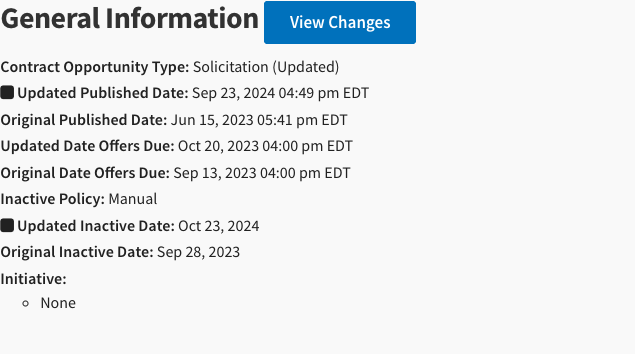
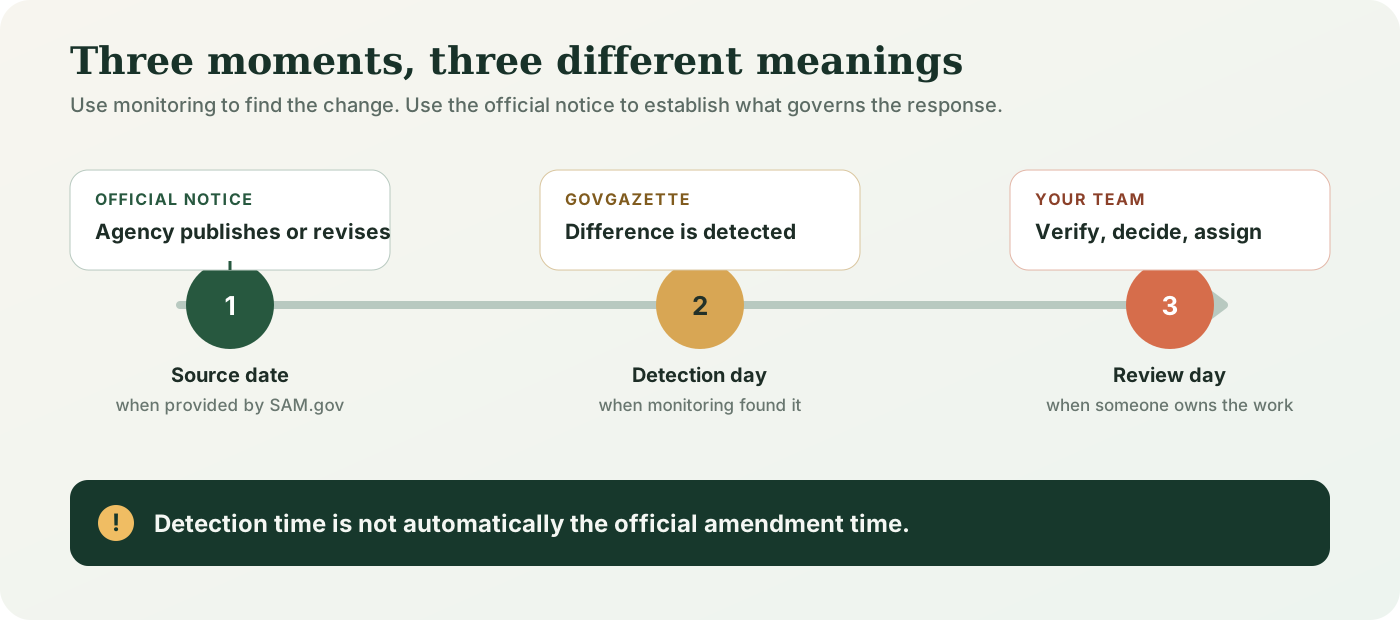
A monitoring system can tell you when it detected a difference. That is not automatically the exact moment the agency amended the solicitation. For normal pursuit work, the calendar day you learned about the change is enough. For compliance, protests, or deadline disputes, rely on the official SAM.gov record and the solicitation documents.
GovGazette shows source dates when SAM.gov provides them and the dates when GovGazette found each change. We do not call an import timestamp the time an agency acted.
5. Assign the next task
A useful alert ends with a decision. Mark it seen, assign or update the next action, add a due date, and mark the review done. Save the reason so the team does not debate the same change again.
GovGazette groups tracked notices and saved-search activity under Opportunity changes. It shows the change in plain English, its effect, and the task your team chose.
A 15-minute daily routine
Keep the review short enough for a busy proposal week. Review urgent changes to tracked notices first, then the daily saved-search digest.
- Five minutes: verify deadline, attachment, eligibility, and status changes on the official notice
- Five minutes: assign actions and update internal due dates
- Five minutes: ignore changes that do not affect a decision, record no-bid reasons, and review new opportunities
Common mistakes
Most failures come from missed steps, not missing data. Do not copy a search into a spreadsheet and then ignore the source. Do not track hundreds of notices with no owner. Do not assume an alert proves the legal effect of an amendment.
- Do not rely on a notification subject line for the new requirement.
- Do not call an import time the agency amendment time.
- Keep useful internal milestones after a deadline extension.
- Do not keep pursuing after eligibility or status changes without a new bid/no-bid decision.
- Do not subscribe to a broad search you cannot review each day.
What to do next
Create one focused search today. Track one opportunity your team may pursue. Name the person who reviews changes. When the first alert arrives, check it on SAM.gov and record a decision or task.
We checked this guide against GovGazette’s change types on July 17, 2026. GovGazette can classify notice, status, deadline, set-aside, NAICS or PSC, link, contact, agency, and place changes when the source data contains those fields.